
 SEARCH
 diglloydTools™



Photoshop CS5 Tests Updated for 16GB Memory in MacBook Pro, 2.8GHz Mac Pro

Related: laptop, Mac Pro, MacBook, MacBook Pro, memory, Other World Computing, Photoshop
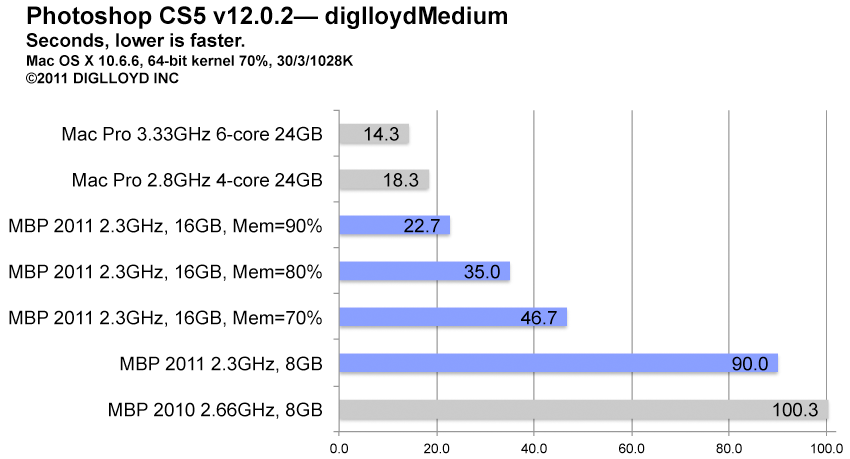
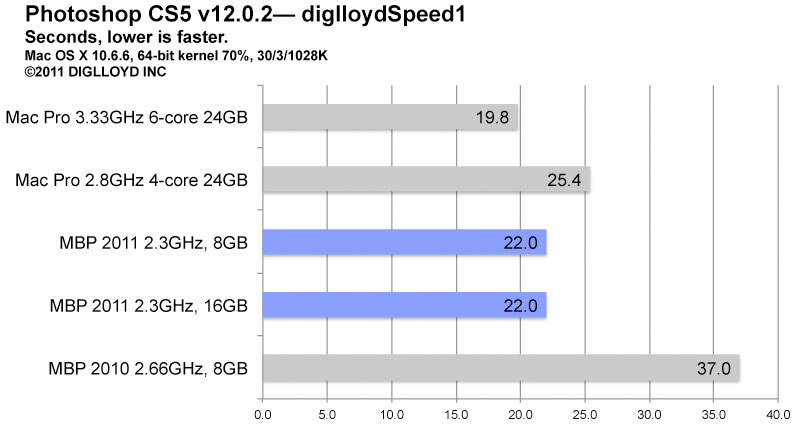
How much difference does 16GB memory make for big Photoshop jobs? It depends on the size of the job. If the memory is enough for the job, the 2011 MacBook Pro can run almost as fast as the 3.33GHz Mac Pro, and faster than the 2.8GHz Mac Pro.
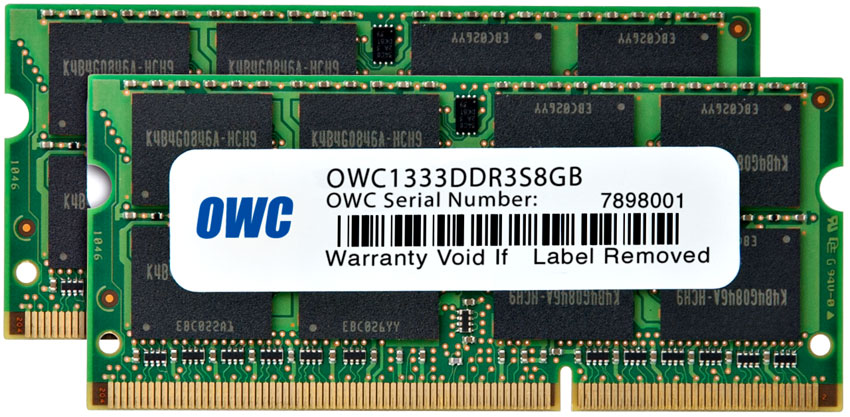
For the tests below, I installed 16GB of memory in the 2011 MacBook Pro, using the OWC 8GB modules.
For the diglloydMedium test, Photoshop CS5 needs about 15.7GB for itself, so the test still runs out of memory, even with 16GB in the MacBook Pro.
But with 16GB instead of 8GB, the test time is almost cut in half with CS5 set to use 70% of system memory, and cut by a whopping 75% when set to use 90% of system memory!
For slightly smaller jobs, the times could be expected to be nearly as fast as the 3.33GHz Mac Pro, see further below for diglloydSpeed1.
In other words, enough is enough— memory. After that, it won’t matter. But until there is enough for the job(s) at hand, performance suffers badly.