

mac performance guidemac performance guide

Up to 2.0TB of Portable, High-Performance, Bus-Powered Capacity
Extreme reliability and performance. Delivered.
Our premium upgrade service provides peace of mind.
MPG Photo Workstation MPG Pro Laptop

WindInMyFace.com — Bicycling blog, gear, rides, training, nutritionBicycling blog , bike and gear reviews, nutrition, training.

Are you a photographer?

Don’t miss all the great articles, news and analysis at

diglloyd.com

Making Sharp Images

diglloyd.com

More Memory With Big Photoshop Jobs = Big Speedup

Many users work with modest-sized images, and so 24GB memory in a Mac Pro is a perfectly reasonable amount (and not very expensive at present in the context of a Mac Pro system or MPG Pro Workstation).

96GB OWC memory in 12-core Mac Pro  
At work today in Photoshop

In my own use, Photoshop regularly chews up 10-15GB just for itself, for 24GB is not enough together with the other tasks I’m doing at the same time. So my standard memory configuration has been 48GB for a while, and I have found that it is enough for my everyday use.


96GB OWC memory in 12-core Mac Pro  
96GB OWC memory in 12-core Mac Pro

Then there are those really big jobs, those billboard-size panoramas, gigapixel images, etc. With too little memory, the fastest Mac Pro slows to a crawl.

In my 12-core 3.33 GHz Mac Pro, I tested using the diglloydHuge benchmark using 48GB and 96GB memory (OWC 8GB memory modules and OWC 16GB memory modules).

To be sure, 48GB is already a lot of memory, but the results show that going from 48GB to 96GB cuts the time dramatically.

Enough memory makes all the difference with Adobe Photoshop  
Enough memory makes all the difference with Adobe Photoshop

It is the problem size versus the amount of memory that determines the benefits, or lack thereof. There is always a threshold at which more memory will help a great deal.

Had there been only 24GB in the Mac Pro for this test, the results would have been far more dramatic. Furthermore, my MPG Pro Workstation setup has an exceptionally fast scratch drive (triple SSD RAID-0 stripe), so that 48GB case actually would be a LOT worse on most setups.

Since a 4-core or 6-core Mac Pro can utilize a maximum of 48GB with Mac OS X Lion, that constraint is one consideration when choosing a Mac Pro model.

Faster save/open

Other speedups are possible that are not memory related— such as the DisallowFlateCompressedPSD plugin for Photoshop 64-bit.

How to Use the MPG Mailing List

http://diglloyd.com/mailinglist/signup.html   
Mailing list — opt in

This site and related sites maintain a mailing list segemented by interests.

The mailing list is very low volume, never sold, and 100% opt-in. I use these lists mainly to notify subscribers of updated to my publications.

  • Use any email you like.
  • Every time an email is sent, a link is provided to update your choices— no login or account needed, so it’s super easy— just check or uncheck choices.

For more info, see the mailing list page.

Where to Buy a Mac Pro, MacBook Pro, iMac?

Looking for an in-stock Mac Pro or other Mac at a great price?

How about a price substantially lower on AppleCare than Apple?

Check out B&H Photo. See my gear page for links to my recommended Mac systems and AppleCare.

See also my Where to Buy a Mac Pro page, Where to Buy a MacBook Pro, Where to Buy an iMac pages.

Need help deciding what is right for your needs, or how to backup reliably? I offer consulting.

MPG Pro Workstation  
MPG Pro Workstation
MPG Pro Laptop  
MPG Pro Laptop

ULTIMATE Mac Pro — the MPG Pro Workstation Solution with OWC PCIe SSD
(for Video and Database and Scientific and Huge Photoshop Users)

Are you a high-end user looking for ultimate performance with ample storage?

OK, so Apple is dragging its heels with a new Mac Pro. But if you need a solution now, why wait?

Here’s the ultimate MPG Pro Workstation to build once the OWC PCIe SSD card becomes available—

Assuming OWC loans me the parts, I’ll build up of these puppies using my existing 12-core 3.33 GHz Mac Pro.

MPG Pro Workstation  
MPG Pro Workstation

OWC PCIe SSD Card Coming Soon

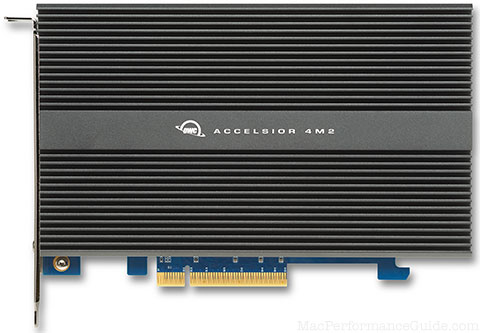
OWC has posted a sneak peak at their new PCIe SSD card, compatible with Macs and PCs:

This card has a “stackable” design, allowing you configure the drive in sizes between 60GB and 2.oTB. This is done using individual mini PCIe daughter cards that attach to the main card. There’s no requirement for all the daughter card slots to be filled at once, which means you can easily expand capacity over time as you need it.

The main card is based around the Marvell 88SE9445 SATA RAID Controller and the individual daughter cards will feature a SandForce 2200 Series controller. It’s compatible with both Mac and PC, and as such, will be the first Mac supported PCIe SSD solution of its kind.

I anticipate having a full test of one of these cards early on, with a report to follow. As soon as it becomes available, I’ll be incorporating this card as an option into the MPG Pro Workstation. (Note that the Fusion-IO card is listed as Mac compatible, but “of its kind” probably refers to the daughtercard approach).

Several things are worth noting:

  • The card is not bootable (just confirmed with OWC engineers).
  • Available with up to 4 x 480GB modules for 1.92TB of user addressable space.
  • Mac Pro users could in theory run a system which has no hard drives installed yet has ample storage— I personally prefer the computer hygiene of separating data and system, so I’d use a separate SSD for my system drive, along with the PCIe card for data storage.
  • A PCIe solution runs at full PCIe bus speed of gigabytes per second. Unlike using SSD drives in the drive bays— current Mac Pro SATA ports limit speed to ~250MB/sec per SSD, and ~600MB/sec as a whole.
  • High end users looking for the ultimate in performance with capacity now have this card as a 2TB option. Since there are 3 slots in a Mac Pro, in theory one could 4 of these cards installed with 6TB of internal SSD storage.
  • By using a PCIe card, all drive bays remain available for use. So one could have 4 X 3TB hard drives as well as 2TB of SSD storage, and another SSD or hard drive in the lower optical bay.
  • I expect that the card will support some forms of RAID (e.g. RAID-5), for the ultimate in SSD reliability.
  • The card capacity can grow with you— add daughter-card modules to expand capacity as your needs grow.
OWC PCIe-based SSD for Mac Pro  
OWC PCIe-based SSD for Mac Pro

OWC 16GB Memory Modules for 2009/2010 2011 Mac Pro — Tested and Run at Full Speed

In January 2012, OWC released the 2nd generation of their 16GB memory modules, which now run run at full-bus speed of 1333 MHz, and perform as well as 8GB memory modules.

According to OWC—

These 16GB modules allow full 1333Mhz bus performance and are faster in both 1066MHz and 1333Mhz memory bus Mac Pros with the Dual-Rank design than the Quad-Rank module options they replace.

Verified

I tested the 16B memory modules on both a 6-core 3.33 GHz and 12-core 3.33 GHz Mac Pro. The modules on both machines showed up as 1333 MHz, and tested at the same speed as the 8GB memory modules, using MemoryTester with the stress command, which display memcpy() speed as part of its operation.

96GB memory in 12-core Mac Pro  
96GB memory in 12-core Mac Pro

OWC 16GB Memory Modules for 2009/2010 Mac Pro — 48GB / 96GB in Mac Pro

OWC 128GB memory for Mac Pro
OWC 128GB memory for 12-core Mac Pro

The revised (Jan 2012) OWC 16GB memory modules now run at full speed of 1333 MHz and one can also mix 16GB and 8GB memory modules (“Dual-Rank 16GB ECC 240 Pin DDR3”).

According to OWC—

These modules do allow full 1333Mhz bus performance and are faster in both 1066MHz and 1333Mhz memory bus Mac Pros with the Dual-Rank design than the Quad-Rank module options they replace.

A 12-core Mac Pro can take 96GB total with six (6) modules. More than that DOES NOT WORK— the Mac Pro will show 128GB installed, but only 96GB is accessible.

I attribute the 96GB limitation to system software issues (bug?), not a hardware limitation. OWC tells me that a Windows boot can address 128GB on the same Mac Pro, so this is clearly a Mac OS X BUG.

Mix and match: 120GB of OWC memory in a 2010 3.33GHz 12-core Mac Pro  Mix and match: 120GB of OWC memory in a 2010 3.33GHz 12-core Mac Pro
Memory beyond 96GB cannot be addressed in Mac OS X Lion (tested)

Using 64-bit MemoryTester, the alloc command can allocate about 91GB of that 96GB before severe virtual memory paging begins. So the absolute limit to addressable memory for a single program about 91GB.

Cut those figures in half for a 4/6-core Mac Pro which can take 3 X 16GB memory modules: about 43-44GB of 48GB.

Adequate memory is crucial for really big files in Photoshop CS5, video processing, etc.

Mix and match

Since the OWC 16GB and 8GB modules can be freely intermixed.

For example, existing 4/6-core Mac Pro users with 3 X 8GB (24GB) could add a 16G module to go to 40GB

Or 12-core users with 6 X 8GB modules could add two 16GB modules to go to 80GB, thus preserving the investment in existing 8GB modules.

Optimal

Optimal setup for maximum memory bandwidth remains triple-channel memory configuration:

  • 3 modules (not 4) in the 4/6-core Mac Pro (fill 3 of 4 slots).
  • 6 modules in the 8/12-core Mac Pro (fill 6 of 8 slots).

However, the real-world impact of triple channel vs dual channel memory bandwidth is very small, so this can be safely ignored for practical purposes, and if the additional memory is actually needed, then more is far faster.

Mix and match: 120GB of OWC memory in a 2010 3.33GHz 12-core Mac Pro 
Max usable memory in 8/12-core Mac Pro is 96GB as 6 X 16GB

Example in my 12-core 3.33GHz Mac Pro

Shown below is one memory configuration in my 12-core 3.33 GHz Mac Pro.

While 128GB is recognized by the hardware, Mac OS X Lion will only use 96GB.

Evidently, Apple engineers don’t test for large memory configurations. This would not be the first reporting bug I’ve seen in Activity Monitor.

Mix and match: 120GB of OWC memory in a 2010 3.33GHz 12-core Mac Pro  (!!!)
128GB will show up, but only 96GB is actually usable.

New Year’s Seafood (or Steak)

I love seafood, and so I felt just like a kid at Christmas digging into the big Styrofoam box that just arrived. Let the eating begin starting today, and building to a frenzy tomorrow night!

Cool double-entendre site name, methinks: SeafoodByNet.com

Seafood or prime steaks, salmon, halibut, oysters, chowder, angus beef, scallops, lobster tails, shrimp, crab, clams. YUM!

Update: I’m super picky about my seafood. I was impressed—

  • The crab legs (frozen) were as good as I’ve had. Not infrequently, frozen King Crab legs are a little “off” in flavor at the body end (so much so that I’d largely given up on them)— these were perfect flavor from joint to tip. I devoured them.
  • The salmon filets were so fresh I could smell almost nothing, indicating VERY fresh fish (fresh fish should have very little odor, odor means bacterial growth). Tip: with all seafood, dry the fish/prawns with paper towels when you get home (unwrap them, dry them, place on paper towels on a plate and cover); minimizing moisture helps keep fish fresh longer).
  • The clam chowder— my family had devoured all but a few spoonfuls of the large container, so all I got was a few delicious spoonfuls, which I suppose is for the best given its delicious creamy texture. I’d say it was a big hit. And it was full of nice big chunks of clams, no skimping there.
  • The large prawns had great flavor with very firm flesh, top-notch quality. I sauteed them in my proprietary cayenne/pepper/garlic/lemon juice/thyme/oregano/butter/olive oil mixture. Fantastic! I over-indulged, to tell the truth!
  • The smoked salmon was perfect— mildly smoked and mildly salty and nicely tender. Way too many types of smoked salmon are too salty or dried out.
  • Lobster tails were of the same high quality. Perfect.
SeafoodByNet.com
SeafoodByNet.com

An SSD-based MPG Pro Workstation Design with Fault-tolerant Time Machine Backup

OWC Mercury Extreme Pro

I did an interesting system design today for a consulting client. After evaluating his specific computing needs (which do not involve much storage capacity), we ended up with this very high performance system, which is a quiet, fast and robust MPG Pro Workstation (Mac Pro, setup ready to use and pre-tested). The client chose the 3.33GHz 6-core Mac Pro for this configuration.

Three solid state drives (Mercury Extreme Pro 6G SSD) configured as follows—

  • Internal 240GB SSD as volume Boot, for system and applications, and some user data, like Mail and Calendar, etc.
  • Internal 240GB SSD as volume Master, for storing larger amounts of user data such as image files and music and spreadsheets/word processing files.
  • Internal 240GB SSD as volume Parallels (independent space for running Windows using Parallels virtualization software).

In addition—

  • For a fault-tolerant TimeMachine volume, 2TB RAID-1 mirror for fast internal backup every hour. See my Time Machine how-to.
  • Dual 5770 video cards to support dual dual-link DVI-D displays.
  • 24GB memory.

This system should yield years of high-performance computing, with low noise, noise power, and high reliability.

Stocking Stuffers and Gifts

Looking for a computing-centric gift?

Laptop users might find the OWC Laptop Upgrade Center really handy.

Backup

OWC Mercury Elite Pro Mini

I’m listing this first, because in my experience, there are way too many people out there just waiting for the day when they’ll lose ALL their stuff.

Some people don’t backup, and some have a single drive attached (thus subject to the same perils as the computer itself).

At a minimum, you should have two (preferably three) external backup drives of all your Stuff stored safely away from your computer. See my backup articles.

There are many ways to backup, but the 'Quad Interface' OWC Mercury Elite Pro drives are my favorite choice for their 4-way interface, solid aluminum case, and portability.

Choose a full-size drive (up to 3TB) or a bus-powered mini drive (up to 1.5TB).

Memory

Memory prices have plummeted for MacBook Pro, Mac Pro, iMac. The MacMini uses the same memory as the MBP and iMac. I recommend at least 8GB for all Mac users— keeps things humming along and eliminates any memory related slowdowns.

Installation is fast and easy on all Macs. OWC also has do-it-yourself installation videos.

Solid state drives

OWC Mercury Extreme Pro

One of the very best upgrades for any Mac is a solid state drive. Once you use a quality SSD, you’ll never want to run off a hard drive again.

I prefer the newest OWC Mercury Extreme Pro 6G models (I have 4 of them in my Mac Pro, and several in laptops). However, all of the OWC SSDs offer superior performance and longevity. Installation in an iMac is best done by a qualified professional, but the MBP and Mac Pro are super-easy to do yourself.

See Upgrading Your System Drive for a super-easy way to replace that slow or too-small hard drive. OWC also has do-it-yourself installation videos.

NewerTech Power2U

NewerTech Power2U
NewerTech Power2U
UL-listed, dual USB

The NewerTech Power2U Wall Outlet with Dual USB Charging Ports eliminates two awkward power bricks, can run a USB LED light, etc. I have one now, and it’s a very nicely made unit, attractive from bezel, and UL-listed in USA and Canada.

Stocking stuffer ideas from OWC

Nearly 300 'CyberSavers'

Accessories, cases, earbuds & More for Apple iPads up to 75% off:

More Memory for Macs new and old up to 96GB, 8GB kits from $46.00

Laptop Stands, Carry Handles, Cooling, locks & More from $9.90

Laptop/Desktop Keyboard Protectors from $7.50 - choice of colors too

Apple Genuine Products and Accessories over 150 & up to 87% off

Mice for your Mac(s) from $5 + Super Apple MagicMouse 'Enhancer'

Photos and Videos = Priceless Memories - Store/Backup Wisely

Easy Sharing too w/Plug and Play USB Drives 4GB to 16GB from $9.50

Write/Create DVDs, CDs, Even Blurays with options from $44

Running late? OWC can get it there.

The OWC team is shipping till after 11PM Monday-Thursday and 8PM on Friday to see that no package gets left behind. We're also here 24/7 until 10PM Saturday (Christmas Eve) and available for 'last minute' tech support, customer service, or delivery status assistance requests. We will be closed Christmas and also on Monday which is a national holiday with no standard delivery services operating nation wide. Our normal 24/7 hours back on Tuesday 12/27 at 12:01AM.

Regardless of the who from - or who to, if expecting delivery by this Friday, my recommendation is to use an Air service. Ground can still get there too... But then best to have some buffer days beyond 'normal' transit time. The high seasonal volume of packages the carriers are now handling, and the weather too, can both add a little extra time right now. If it's got to be there, sooner is better - with air service, better yet.

FWIW - from OWC's location, about 80% of the USA receives delivery within 1-3 days via FedEx and/or UPS Ground (non-postal) options we offer. The site also gives good delivery time estimates for these tracked services that can further help in selecting. Free Ground remains available, but discounted 2nd Day and even Next Day options are best for getting it there if needed quick.

Price for MacBook Pro 16B Memory Plunges (or 32GB for iMac)

Wow! I thought $400 was a great price, but at $330, a 16GB kit for a 2011 Macbook Pro is a no-brainer for any power use. Or a 12GB kit for $200.

The prices for iMac memory have declined similarly (same type of memory).

I’ve updated:

Apple MacBook Pro memory price history for 16GB (2 X 8GB) 1333 MHz memory

Mac Pro Now, or Wait?

A number of readers have written to ask whether to invest in a Mac Pro now, or whether to wait. I share my thoughts on that here. See my previous thoughts on No New Mac Pro Yet, Which Means What? and End of Life for the Apple Mac Pro? Still no word from Apple.

Fast enough

The existing Mac Pro meets my needs, which are relatively demanding. Sure, a faster CPU would be nice, but would it actually improve my productivity in a significant way? No.

In short, fast enough is fast enough, and beyond that, it’s not a serious issue.

On the other hand, if your work is suffering from an aging or too slow system, moving to a Mac Pro system now (with appropriate drives and memory) is likely to save you more time even in the short run than the difference between a current Mac Pro and a new one, because if the new model is 10 times faster (just for giggles), it wouldn’t speed up 95% of what I use my Mac Pro for; the current one is “fast enough” for just about everything I do.

Upgrades

Your existing system might actually be fast enough, but it might be that the drives are slow, or your work demands more memory than is available. Investigate memory usage and pay attention to disk speed; it might be that a modest upgrade is enough to deliver satisfaction.

Especially with a laptop, a slow drive and/or a measly 4GB of memory can be a wet blanket on a cold day.

On the other hand, if all CPU cores are fully utilized, then only more or faster CPU cores are going to help. You can upgrade the CPU in the 2009 and 2010 Mac Pros. For those with a slow 4-core , moving to a faster 4-core CPU or 6-core CPU is a relatively good deal (upgrading from a single CPU to dual CPUs is much more expensive, due to the parts involved).

Fault tolerance

Another reason to get a Mac Pro are the options it offers for expansion, backup and fault-tolerance (via RAID mirroring for example). All those things with high performance too. If your work depends on uptime, then a system that puts you at risk from a black-swan failure is grounds for a high priority upgrade.

Buyer’s remorse

Skip the buyer's remorse.

Computers get a little better every 6 months. But until then, a system that meets your needs, even it lacks full sex appeal, has nonetheless given you the benefits for a significant period of time. That aspect is often overlooked; skip the buyer’s remorse and realize that “killer” breakthroughs in performance are rare, and that a balanced system (CPU, ample memory, fast drives, solid backup) is what matters.

Computers, Cameras, or taxes?
Section 179 Full Write-Off for Small Businesses

Here in the US, if you’re a small business, you can buy gear for your business and write if off 100% (federal) under Section 179 of the Internal Revenue Code.

Certain limitations apply. Be sure to ask your tax advisor about “section 179" — how about writing off the entire cost of the equipment for 2011, instead of 20% over five years. You have until Dec 31, 2011. State tax laws vary, but here in California, one must still depreciate for state tax purposes.

This accelerated deduction might not be renewed for 2012, so take action now.

Consult your tax advisor here, I am not giving tax advice, just mentioning the topic for your own investigation.

So if you’re planning on buying a Mac Pro or buying a MacBook Pro, now’s the time for this year’s taxes, and check out the MPG Pro Workstation and MPG Pro Laptop upgrade programs too, but don’t wait till after Christmas, too little time to execute.

Ditto for photography equipment.

And thank you for buying your stuff through my links.

Installing Mac OS X Snow Leopard on an Apple Mac Pro That Shipped with Lion

Reader William M wrote me about his trouble in installing Mac OS X 10.6 Snow Leopard on his new Apple Mac Pro (which shipped with Mac OS X Lion).

I wonder if Apple has a clue how many people are irritated by Lion? My own father is not a happy camper, having lost the ability to run several useful applications (no more PowerPC support in Lion). Apple has become increasingly unconcerned about the impacts its puerile decisions about user interface and features have on those who want to get work done, not just those with time on their hands to listen to music or watch movies.

Anyway, to install Mac OS X Snow Leopard on the 2010 Mac Pro, obtain a Mac OS X version 10.6.4 Snow Leopard install disk that shipped with a 2010 Apple Mac Pro.

The Mac OS X Snow Leopard “family pack” disk will not work (I tried mine), because it’s Mac OS X 10.6.3, and version 10.6.4 is required for the 2010 Mac Pro.

Workaround

If you can install Mac OS X Snow Leopard on any Mac that is capable of running 10.6 Snow Leopard. After installing, you run Apple’s Mac OS X Snow Leopard combo updater.

The resulting system should now boot any Mac; clone that volume to any internal or external Mac Pro volume, then boot up. Just in case, run the combo installer a 2nd time (in case there are any machine specific nuggets needed). One reader reports strangely slow performancd when “crossing” between Mac models, which I have also personally observed once. So run that combo installer on the target machine.

Is your computer feeling a bit dated?

Consider a new MPG Pro Workstation (based on Mac Pro) or MPG Pro Laptop (based on MacBook Pro).

Speed Limit 15 high in the White Mountains of California     
Dated computer?

Deals: Memory Prices for MacBook Pro Plummet, OWC Offers Free Shipping for over $29 orders

Other World Computing (OWC), our trusted vendor (see recent reader feedback), has an incentive to order while time is still a plenty: free Delivery for orders totaling $29 and up!

Memory, iPad cases, DVD/Blu-Ray drives, storage, SSDs, you name it— through the end of next week shipping is on OWC within the 48 contiguous US States with any basket that's $29 or greater! OWC also has great rates for Hawaii, Alaska, and even International too..

Other deals

Amazon up to $50 Instant Off

16GB for MacBook Pro has dropped to $375. 12GB for $204. WOW!

Many other deals available via the OWC newsletter.

A hard disk has a real speed limit, try an OWC SSD and see your Mac fly.

Speed Limit 15 high in the White Mountains of California     
Speed Limit 15 high in the White Mountains of California

NewerTech Power2U Wall Outlet with Dual USB Charging Ports

I didn’t even know that such a product existed, but how handy!

I have a bike taillight that charges by USB, and both iPad and iPhone can be charged by USB as well. As well as a host of other peripherals, like LED reading lights.

According to OWC, it is the only UL Certified product of its type on the market, for both USA and Canada.

Beware of other non-certified products which might put your safety at risk.

Replace your standard outlets with the NewerTech Power2U Wall Outlet and you get dual USB charging ports right on the outlet. Very cool.

NewerTech Power2U Wall Outlet with Dual USB Charging Ports        NewerTech Power2U Wall Outlet with Dual USB Charging Ports
NewerTech Power2U Wall Outlet with Dual USB Charging Ports  

OWC Warranty Service on iMac Modifications

OWC provides a variety of upgrades to the Apple iMac, some of which are intrusive, at least compared to a Mac Pro, since they involve opening up the iMac and/or modifying the iMac case for an external SATA port.

The OWC upgrades are the best way to make an iMac more capable, solving some performance and expansion limitations. The 3.4GHz iMac is a very fast machine, and so with some upgrades it might be a viable Mac Pro replacement for some users.

Andrew H in the San Francisco Bay Area writes:

Wanted to let you know about a great customer service experience I had with your sponsor OWC/Macsales.

I purchased a 2011 i7 iMac two months ago, and based mostly on research from your site, I had it modded by OWC. I had them install 16gb of RAM and two 120GB SATA III SSD drives. After setting up the two SSDs in a RAID 0 configuration, the machine just screamed (almost 1,000Mbs read speeds).

About a month ago, the Apple Software Update said there was an EFI 1.7 update for my iMac. Without thinking, I clicked update. It instantly bricked my machine -- and endless loop of trying to install the update, then nine SOS beeps and a reboot.

I have no idea what happened, but I'm sure that this was Apple's crappy software update. I know that my machine is not officially supported, but it seems that Apple should be smart enough to write updates that don't brick machines.

I took it to the Genius bar. After several iterations they refused to do anything, saying it was out of warranty. They offered to replace the logic board for $750. So I sent it back to OWC. They have no idea what caused the problem, but offered to fix it (under the one-year warranty). They ended up sending it to an Apple Store in Deer Park, IL and paid $750 to replace my logic board.

What a great company -- and so smart to do this. It's a drag that this happened, but the fact that they stepped up to cover my warranty issue is a really smart business move on their part. All part of being in the Mac-modification business...

Anyway, just thought you would find this interesting.


Hard Disk Drive Price Trends

The flooding in Thailand has caused severe supply disruptions for hard disk drives. See Memory and Hard Drive Prices: Win Some, Lose Some as well as the previous OWC Comments on the Hard Drive Availability Situation.

The latest (opinion) from Larry O'Conner at Other World Computing (OWC); OWC sells a lot of hard drives and external drives which use hard drives, as well as their solid state drive offerings.

Supply has eased a little bit, but still ugly for next few weeks - but we've gotten some allocations with better costs than we had to pay in November and that's helping. I personally believe we'll see normality by July and that end of the year is wishful profit thinking on the HD makers part.

WD is short about 60 mil drives... But they have the highest capacity once back online and they are coming back online quicker than expected. Seagate and Hitachi have added combined about 15-18 mil drives to their Q1 production plans... I think by mid-Summer will be a lot better... And definitely bigger improvements by April.

Lower capacity notebook drives are scant to be found at all right now FWIW though. Note - all my opinion on future.. Could be longer or shorter... Currently industry experts believe 12-15 months recovery.

Trends I see suggest another 5-7 months to be back to normal output and likely a lot higher than pre-flood till catch up. But up to the big three in terms of impact to the price side of equation. Supply will determine though and sure seems like supply will be back by mid-Summer to pre-flood.

No New Mac Pro Yet, Which Means What?

Mac Pro

Deadware?

I wrote previously End of Life for the Apple Mac Pro? Still no word from Apple.

Update Dec 5, 2011: the rumors seem to point to a new Mac Pro, but whether it will come in January or February or March remains to be seen.

We still don’t know whether Apple will release a new Mac Pro (though this article hints at a new video card), which pretty much sums up as follows— a company with so much contempt for its traditional professional base that it cannot be bothered to state whether it will or will not produce an updated Mac Pro, upon which many professionals depend, including me.

Not to pre-announce features or anything specific, but just an intent that would would allow its loyal customers to make some future plans, even if that is only to purchase an existing Mac Pro model for those needing the expansion capabilities. Reprehensible business conduct if you ask me.

So what can we Mac Pro users do? Wait and see.

Would I switch to a PC if there is no new Mac Pro? Certainly not in the next few years, Apple has me on the hook not for its hardware, but for its software (Mac OS X), at least if it’s not bastardized any further than the puerile designs and features we saw introduced with Lion.

Windows: not at this time! Investing in a virus-prone operating system like Windows, investing 40-80 hours of relearning just makes no sense— I’d rather deal with an iMac, which isn’t terrible, and would be serviceable with 32GB memory and Thunderbolt (well, I might need two of them).

In the meantime, existing Mac Pro users can go as powerful as dual 3.46 GHz 6-core processors outfitted as an MPG Pro Workstation also, so I really don’t see that there is a lack of processing power for those who must have it, along with up to 96GB memory.

See my recommended Mac systems.

Mac Pro, done right

If you’re buying a Mac Pro, get a Mac Pro here, then do it up right.

Memory Price Trends Graphs Updated

I’ve updated:

All prices have declined, with the 32GB kit for the 2010/2011 iMac showing the largest drop.

Apple iMac memory price history for 32GB (4 X 8GB) 1333 MHz memory

End of Life for the Apple Mac Pro? Still no word from Apple

[This is a repost, since there seems to be continued interest. I’m not aware of any new credible information on what Apple will or will not do].

There is online speculation that Apple might EOL (end of life) the Mac Pro (see also), just as was done for the XServe. In short, no new Mac Pro.

Update: enter your feedback to Apple at http://www.apple.com/feedback/macpro.html.

Apple Mac Pro

Martin D writes with some excellent questions:

This sort of speculation about the future of the Mac Pro is disconcerting, especially when cross referenced with Apple's recent “consumerization” of all its “pro” apps (Logic will be the last one to fall, probably in Q1 or Q2 2012). You've touched on this in the past without going into a lot of exploration.

  • Does Thunderbolt really have the potential to obviate the need for a computer with multiple integrated drive bays?
  • Could an enlarged Mac Mini accommodate bigger processors, large amounts of RAM, and copious external storage and thereby actually replace a Mac Pro?
  • Seems even if you removed all the internal drive bays and card slots from a Mac Pro and collapsed it accordingly, you'd only save about 50% of the volume because of the CPU heat sinks and power supply. (I suppose you might not need such a large power supply.)
  • Will tiny SSDs actually wipe out the mechanical hard drive? What time frame?
  • Does that mean a new, more space-efficient drive form factor is coming? (Apple has already started wiring SSDs into their motherboards.)
  • If Apple lets the Mac Pro fade away, what is all this stuff converging on? Laptops for everybody?

Within Apple itself are legions of programmers who have to compile enormous code bases, designers who produce high resolution artwork, filmmakers who produce high definition video—it's not like they are actually blind to high end needs: they have daily high end needs of their own. Seems like something else is going on here.

DIGLLOYD:

Let’s keep in mind that nothing is decided yet— the demise of the Mac Pro could be greatly exaggerated. But it is disturbing to me that Apple could decide to drop the Mac Pro; it is my daily machine and has been for years, for good reason.

However, as I wrote on July 21st:

It’s simple: business investments go into products that matter to profits. The Mac Pro is almost an irrelevancy at this point, contributing perhaps 1% of Apple’s sales, with iPhone and iPad dominating the lineup, and laptops after that.

Dumping power and elegant products is a slippery slope that breeds other poor decisions for other parts of the user base (What should we drop next? Which pro software should we dumb-down or drop or alter beyond recognition, showing disdain for our users who make a living using it?).

To see the world degrade into generic shiny parts for teenagers, and away from solidly-built pro-level gear is deeply disappointing. It feels like a violation, especially after investing large sums over the years.

Alienating the user base — a strategic blunder

Eliminating the Mac Pro would alienate high end users (including me), who really do need the Mac Pro. Such users are key influencers who would be hung out to dry, no doubt with assertions from Apple that some replacement “solution” is just as good, but would in reality be a compromise and frustration for high-end users.

Elimination of the Mac Pro would be a long term strategic mistake that in my mind would signal the coming demise of Apple (believe it or not), not for the loss of the Mac Pro on its own, but because it’s a warning shot for all high end users that their needs are not important— so look elsewhere. And thus a warning shot to any user thinking about brand loyalty, and building a professional solution around Apple products. Death to the ecosystem. No company prospers forever, and the first step is failing to honor apparently small market segments that matter much more than bean counters realize.

Dovetailing into the whole thing (as Martin notes), is the consumerization of everything, including the features in Lion. My Mac is not an iPhone, but clearly that is not understood at Apple. The Mac is getting harder to use, not easier, and all that eye candy being thrown in is not easier, it’s more confusing, something I see firsthand with friends and clients. As Exhibit A, I present iTunes, a kitchen-sink mess.

When a company steps away from respecting a core part of its user base reliant upon the Mac Pro (many key influencers in there!), Apple loses their support in many ways; it’s a crack in the door for alternatives. Competition is slobbering over the iPhone and iPad market. They will succeed sooner or later (probably later), but Apple does not need to accelerate the process by alienating professional users.

What does the Mac Pro offer?

No other Apple computer can replace a Mac Pro in raw computing power, memory expansion, drive support, PCIe card support, etc. Good enough for most people is not good enough for many professionals.

The MPG Pro Workstation is my design for those professionals.

A small box with a messy jumble of cables daisy-chained along is a space-management, reliability and noise headache. There are technical issues too:

  • Memory capacity is at most 32GB in an iMac today, and that’s the most expensive memory, because it has to be high density memory. By comparison, a Mac Pro can go to 96GB (or 48GB in 4/6-core models), at very reasonable cost. I cannot work efficiently with less than 48GB.
  • Thunderbolt is bandwidth limited to about 1GB/sec, it is certainly no replacement for a card in a PCIe slot, especially high performance cards.
  • It will take years for Thunderbolt to evolve an ecosystem of parts that high-end professionals need. And unless the PC world also adopts Thunderbolt, Apple will take us back to the days of product bifurcation, with Mac-specific products costing more, with fewer choices.
  • PCIe cards are not suitable for Thunderbolt, at least not high performance cards, such as graphics cards.
  • For expansion, a tangle of external boxes and cables is a mess. And a reliability problem. And a power supply quality problem. And noisy. Having up to six internal drives all on a very high quality power supply is a huge plus.
  • Reliability is enhanced by the ability to have multiple drives, ECC memory, a robust power supply, efficient cooling, etc. A MacMini or iMac do not offer any of those attributes.

Reader response

Warren S writes:

I agree completely with your November 1 article on the Mac Pro's potential demise. I own a Mac Pro which I would have a difficult time doing without. The iMac would not be adequate. Of course, unless there has been an a announcement this is all speculation. It could be Apple is simply waiting until the new Intel processors ship in Q1:12?

However, why not send your excellent article to Apple? They need to see it and read the arguments presented. A company like BMW seems to do well making a small number of M cars which offer maximum performance alongside more mainstream models designed for the general marketplace. Apple can and should continue to do the same. All one has to do is to think in terms of maximizing customer satisfaction along with achieving superior profitability. These dual mandates are not at odds.

DIGLLOYD: Submit your feedback to Apple here. I submitted a link to this piece, but no word from Apple whatsoever.

MPG Reader Special Prices at OWC — even lower than Black Friday prices

I’ve arranged even BETTER prices on select items for MPG readers only — significantly better than even the OWC Black Friday prices.

Good deals! REALLY good deals.

The links found here (only) yield these prices (via cookie, kill that cookie and pay a higher price if you prefer). In case you really wanted to verify.

Valid through Monday end of day— Deals go away after 11:59PM Monday.

16GB memory for
MacBook Pro 2011, MacMini 2011, iMac 2010/2011

Special MPG price $499.99 => $450 ($50 off!).

OWC Mercury 16GB memory kit for MacBook Pro 2011, MacMini 2011, iMac 2010/2011

Mac Pro 2009/2010 Memory Deals

Special MPG prices for either 1066 MHz or 1333 MHz memory for Apple Mac Pro. Compare MPG vs regular prices here.

Special prices shown in green, click to view the deals at OWC.

OWC Mercury EXTREME Pro 6G

The SSDs I use in my Mac Pro and MacBook Pro for lightning-fast disk performance. I have about 10 of them, including my all-SSD Mac Pro.

240GB for $450 and 480GB for $1040 for MPG

OWC Mercury Extreme Pro 6G SSD

Data Doubler + Mercury EXTREME Pro 6G Bundles – Save even more

DataDoubler + 240GB bundle $495 or DataDoubler + 480GB for $1079

And more savings –

Buy ANY Data Doubler (0GB Kits on special from $65; Bundle deals from $99.97) and get the External Enlcosure for Apple Superdrive for FREE!

Free shipping

Available Free Shipping on all of these items + the up to $50 Instant Savings with Amazon Checkout is also available.

From OWC:

The source/apc string activates these special prices. And once activated, it’s maintained by cookie. For anyone not sure these are ‘extra specials’ for MPG – can give them this link to kill the discount.


QX2 4-Drive Enclosure with RAID 0/1/5/10

diglloyd Home Page | Terms of Use | Copyright © 2008-2010 diglloyd Inc, all rights reserved. | Contact | Newsletter + Alerts | Press