

 SEARCH
 diglloydTools™
Designed for the most demanding needs of photographers and videographers.
The fastest, toughest, and most compatible portable SSD ever with speeds up to 2800MB/s.

$220 SAVE $130 = 37.0% Western Digital 16.0TB Western Digital Ultrastar DC HC550 3.5-in… in Storage: Hard Drives
|

|

|

|

|

|

|

|

|

|
Starting a Time Machine Backup When Desired

Time Machine should normally be left running in automatic mode, giving you regular backups that cost you no mental effort.
You can initiate a Time Machine backup whenever you like, even if Time Machine is turned off: you can leave it turned off, and just backup whenever you choose instead. This might be preferred for some specific uses, such as with Adobe Lightroom. However, turning off Time Machine means you lose protection for everything until the next time you manually start a backup.
Tips
The same ideas hold any time you’ve completed some important work.
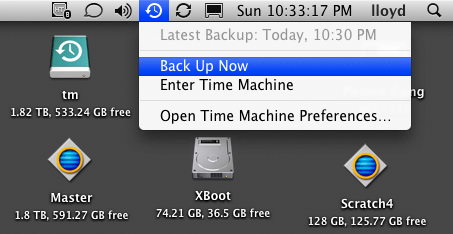
Automated, but start a backup anytime
View all handpicked deals...
Seagate 22TB IronWolf Pro 7200 rpm SATA III 3.5" Internal NAS HDD (CMR)
$500 $440
SAVE $60
Seagate 22TB IronWolf Pro 7200 rpm SATA III 3.5" Internal NAS HDD (CMR)
SAVE $60
